Stop Uploading PDF Menus: Design a Menu for the Web
Most diners check your menu before they choose you. Here's why a PDF lets them down on a phone, and how to build a web menu that's quick to read, easy to update and easy for Google to find.
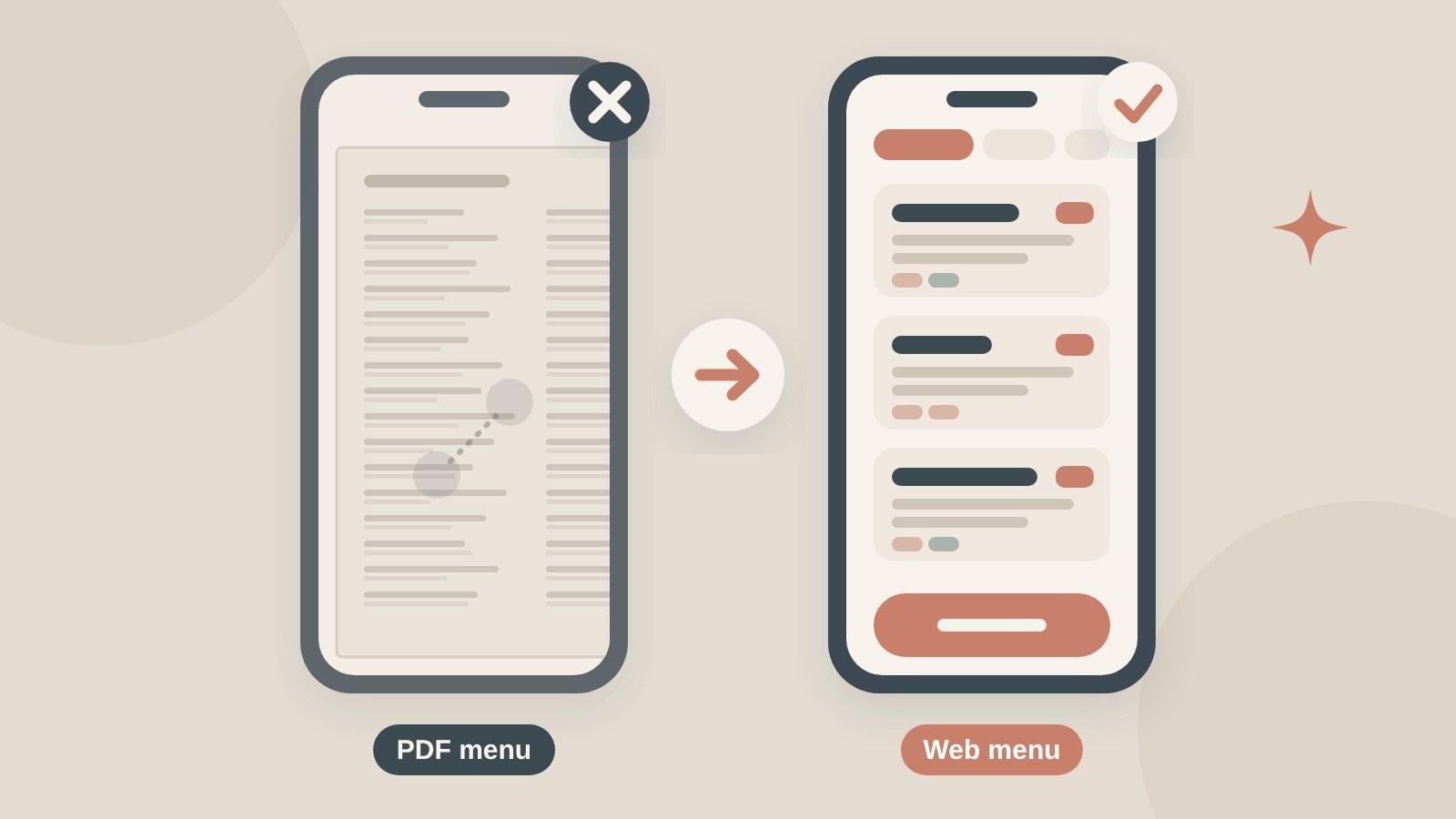
A restaurant menu for the web should be a normal web page: real text, clear sections, prices, short descriptions and dietary tags, readable on a phone without zooming. A PDF can sit next to it as a printable extra, but it shouldn't be the main menu. It's slow to open on mobile, awkward to read, and harder to keep current.
The menu is often the page that decides the visit. In DoorDash's 2026 Restaurant Industry Trends survey (Dynata, March 2026, 3,001 US consumers), 60% said the menu is the main factor when they choose a restaurant. This guide shows how to turn yours into a page that does that job well.
Key takeaways
- Put the menu on the page as text, with prices, and keep a PDF only as an optional download.
- Write a line for every dish. 93% of diners in DoorDash's survey want detailed, appealing descriptions.
- Tag dietary needs and allergens clearly. In the UK, allergen information has to be available before an online order is placed.
- Update the page the same day your prices or dishes change, and link to it from Google.
Why are PDF menus a problem on phones?
Think about how people open your menu: on a phone, often standing outside or sitting in a car. A PDF made for an A4 page has to be downloaded first, then pinched and dragged around to read each line. Many phones open it in a separate viewer, and the guest loses your site's buttons for booking, ordering or calling.
There are other costs too. A PDF is usually designed in another program, so a price change means editing the file, exporting it and uploading it again. That's why so many PDF menus online are a season out of date. And Google may not notice the new version quickly: on the October 2026 episode of Google's Search Off the Record podcast, Martin Splitt and John Mueller said PDFs are often static, so Google may revisit them less often than normal pages.
Accessibility is the third problem. Screen readers struggle with PDFs that were exported as images or without proper tagging, and a web page with real text and headings is much easier to get right. It matters in the US: UsableNet counted 5,114 digital accessibility lawsuits in 2025, and food service accounted for 21% of them. We covered the basics in our ADA website compliance guide.
What should a web menu page look like?
Keep it simple and fast. A good menu page has:
- The restaurant name, today's hours and a booking or ordering button at the top, so guests can act without scrolling back.
- Section links (Starters, Mains, Desserts, Drinks) that jump down the page, or tabs for lunch, dinner and brunch menus.
- One dish per block: the name, a one-line description, the price, then small tags.
- Text at a readable size on a phone and good contrast between text and background.
- A "last updated" date near the top, so guests trust the prices.
Avoid putting the menu in an image, a slideshow or a pop-up. The same rules apply as for any fast mobile page, which we explain in how a fast, mobile-friendly site brings in more revenue.
How do you write menu descriptions that sell?
Short and specific wins. One line per dish is enough if it says what's on the plate and why it's good: the main ingredients, how it's cooked, and anything that comes with it.
DoorDash's survey shows what diners look for. 93% want detailed, appealing descriptions, and 52% want to know what comes with a dish, like sides, sauces and add-ons. Fewer asked for portion sizes (27%) or for popular items to be marked (31%), but both are easy to add.
Here's the difference, as an example:
- Before: "Chicken salad"
- After: "Grilled chicken, little gem, parmesan, sourdough croutons and lemon dressing. Add avocado +2"
The "after" version answers the questions a guest would otherwise ask the server. Write in your own voice, and use the dish names your regulars already know.
How should you show allergens and dietary tags?
Use short tags next to each dish, such as V (vegetarian), VG (vegan), GF (gluten-free) and a chili icon for spicy, and explain them once at the top of the menu. Use words, not just icons or colors, so screen readers and colorblind guests get the same information.
Guests notice this. In DoorDash's 2026 survey, 59% of consumers said they actively look for allergen and dietary information or welcome it when it's there.
If you take orders online in the UK, it's also the law. The Chartered Institute of Environmental Health explains that allergen information must be available to the customer before they place an order, and again when the food is delivered. It covers the 14 named allergens, including milk, eggs, cereals containing gluten, tree nuts, peanuts, sesame and fish. Keep a full allergen chart on your site, and tell guests to ask staff about severe allergies. Check the rules that apply where you trade.
Do you need photos on your menu?
Not for every dish, but your best sellers should have one. 47% of diners in DoorDash's survey said menu photos should clearly match the item, so use real photos of your own plates, shot in daylight, rather than stock images.
Keep the files small so the page stays fast, and add a short alt text that names the dish. Our photography shot list was written for hotels, but the food and detail shots work the same way for a restaurant.
How do you keep the menu up to date?
Pick a setup you can change yourself in a few minutes. On most website builders and content systems, the menu can live as a list of dishes with fields for name, description, price and tags. You change a price in one place and the page updates.
Then make a habit of it:
- Update the web menu the same day a dish or price changes.
- Change the "last updated" date.
- Check the menu link in your Google Business Profile points to this page. Our Google Business Profile guide for restaurants shows where the menu fields are.
- If you offer online ordering, make sure the ordering menu matches. We explain why your own ordering pays off in our post on direct online ordering.
Keeping a printable PDF is fine for guests who want one, as long as it's a download link under the web menu, generated from the same up-to-date list.
What else should be on the menu page?
The menu page is often the most visited page on a restaurant site, so put your next step on it. Add the booking or ordering button again after each section or at the bottom, your address and phone number, and a link to your private dining or events page if you have one. Our list of restaurant website must-haves covers the rest of the site.
Frequently asked questions
Can Google read a PDF menu?
Yes, Google can index PDFs. The problem is everything around it: PDFs may be recrawled less often than web pages, so old prices can stay in search longer, and they're harder to read on phones. A text menu on a web page is quicker for guests and easier for search engines to keep current.
Should I remove my PDF menu completely?
You don't have to. Keep the main menu as a web page, and offer the PDF as an optional download for guests who want to print it or share it. Just make sure both come from the same up-to-date list, so the prices never disagree.
Should restaurant menus show prices online?
Yes. Guests use the menu to decide if a place fits their budget, and a menu without prices makes them guess or leave. If prices change often, show them anyway and keep a visible "last updated" date so guests know the information is current.
Is a QR code menu the same as a web menu?
A QR code is only a link. If it opens a PDF, guests get the same small text and zooming problems at the table. Point your QR codes to the web menu page instead, so guests in the dining room and guests at home see the same clear menu.
The bottom line
Your menu is the page guests check before they choose you, and most of them will open it on a phone. A text menu with clear sections, honest descriptions, prices, dietary tags and a few real photos does that job far better than a PDF. It's also quicker for you to update.
Your one action today: open your own menu on your phone and time how long it takes to find a main course and its price. If you have to zoom, it's time to move the menu onto the page.
Want a menu page that's easy to read and easy to update? Book a call and ask for a free look at your site.
Sources
- DoorDash, "From the Doorstep to the Dining Room: New DoorDash Survey Data" (2026 Restaurant Industry Trends report; Dynata, March 2026, 3,001 US consumers; May 18, 2026)
- Restaurant Business, "How restaurants can be found and favored by diners" (on DoorDash's 2026 report; accessed November 15, 2026)
- TechWyse, "Google Says PDFs Can Rank in AI Search, but Updates May Lag" (on Search Off the Record, October 13, 2026; published October 15, 2026)
- Google Search Central, "File types indexable by Google" (accessed November 15, 2026)
- UsableNet, "2025 Year-End Digital Accessibility Lawsuit Report" (data to December 15, 2025)
- Chartered Institute of Environmental Health, "Selling food online: Allergen responsibilities explained" (accessed November 15, 2026)

Djaner Bekir · Founder of Art of The Code. 15+ years in destination management, now building websites for hotels and restaurants. About
Want a website that turns lookers into bookers?
Related posts
 Trends & design9 min read
Hotel Photography That Sells: A Shot List for Your Website
 Trends & design9 min read
Your Hotel Homepage Has 5 Seconds: What Guests Look For
 Trends & design9 min read
Restaurant Website Must-Haves: 12 Features That Fill Tables