People expect quick answers and easy booking at any hour. This article shows how an AI concierge can handle reservations, confirmations, and basic questions day and night. You will learn what it does, how it works, what to look for, and how to measure success. Read on to get clear, practical steps you can use on your site or app.
Why an AI concierge matters
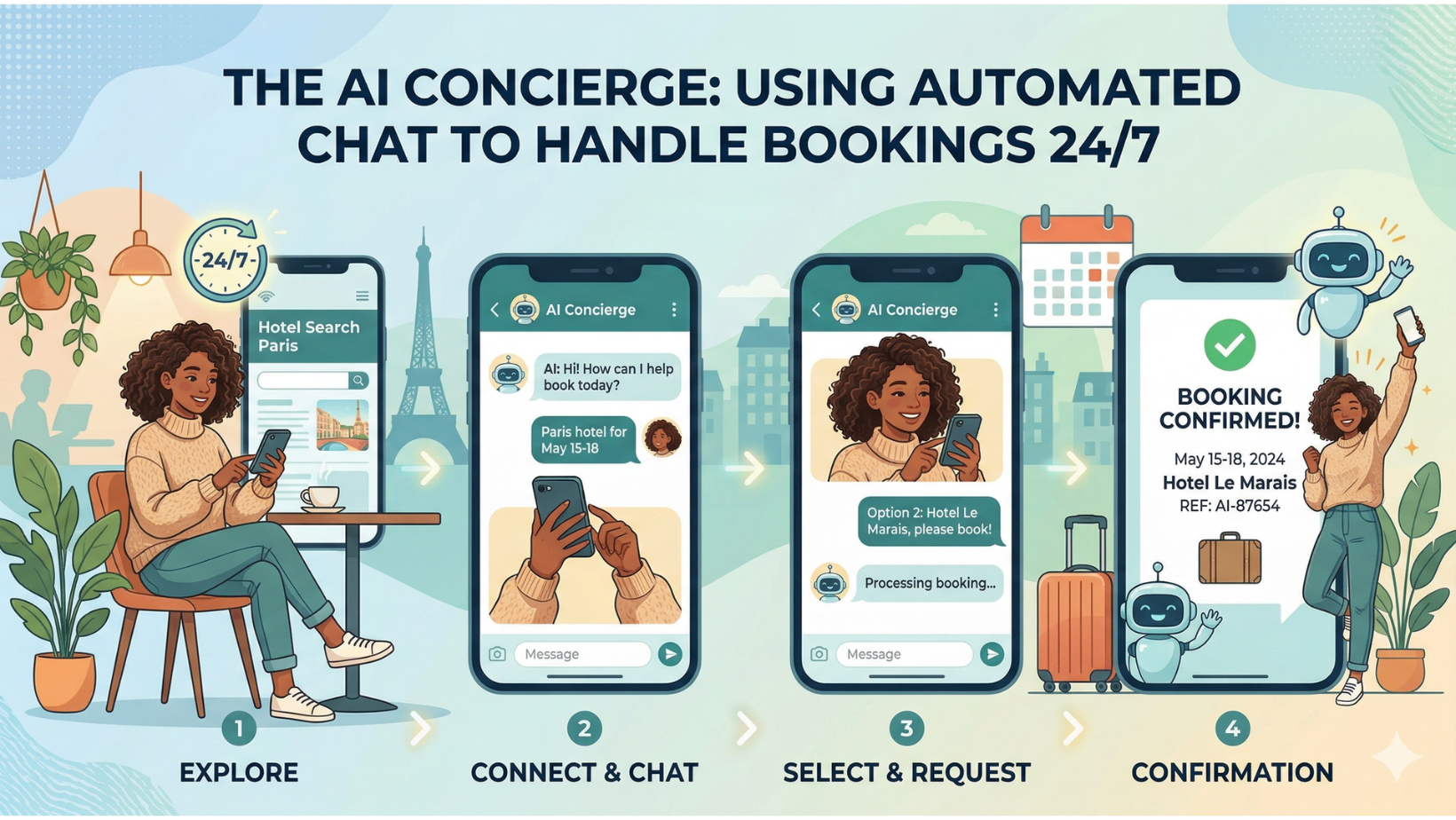
An AI concierge keeps your booking flow open all the time. It answers common questions, schedules meetings, and helps people choose the right option. This reduces wait times and avoids missed opportunities when staff are not available.
Customers expect fast, friendly service. When your site or app answers in seconds, people feel confident and more likely to complete a booking. The AI handles routine tasks so your team can focus on higher value work.
For small businesses, a virtual concierge can act like an extra team member at low cost. It scales easily during busy times and keeps booking errors down. This leads to more steady revenue and better reviews from customers.
How automated chat handles bookings
Automated chat uses rules and smart models to guide a user from greeting to booking confirmation. It asks the right questions and checks availability in real time. The system then confirms the reservation and sends any needed details.
The chat can take payment, collect contact details, and apply discounts if needed. It can also handle rescheduling and cancellations. All of these steps follow a clear script so the process feels smooth and simple to the user.
When a situation is tricky, the chat can route the conversation to a human agent. That handoff keeps the user from getting stuck. The right balance between automation and human help improves trust and conversion rates.
Key features to look for
Before choosing an AI concierge, know which features matter most. Look for natural language understanding, calendar integration, secure payment handling, and easy escalation to staff. These are core capabilities that keep bookings accurate and customer friendly.
Below is a clear list of the most useful features and why each matters. Read it to compare vendors and pick a solution that fits your needs.
- Natural language understanding – Lets the bot read plain language and respond in a helpful way.
- Calendar and availability sync – Keeps bookings from overlapping and shows real-time slots.
- Payment processing – Enables secure deposits and full payments inside chat to reduce no-shows.
- Multichannel support – Works on web, mobile, and messaging apps so customers can book where they are.
- Escalation paths – Smooth handoff to staff for complex cases or VIP customers.
- Analytics and reporting – Shows bookings, drop-offs, and common questions to improve the system.
Each feature plays a role in reducing friction and making bookings reliable. Prioritize what you need now and plan for growth as your traffic increases.
Designing the booking conversation
Good conversation design is simple, clear, and helpful. Start with a friendly greeting and a short menu of choices. Let users pick intent such as “book”, “change”, or “ask a question.” Keep prompts short and avoid too many options at once.
Use confirmations and short summaries after each step. For example, after selecting a date and time, show the choice back to the user and ask for confirmation. This reduces mistakes and builds trust. Use plain language and avoid jargon.
Prepare fallback prompts for when the bot does not understand. Offer choices, ask clarifying questions, or suggest connecting to a human. Clear fallback paths keep users engaged instead of frustrated.
Implementation steps
Start with a clear plan and small scope. Choose the core booking flows you want automated first, like single-service reservations or appointment setting. Test internally before opening it to customers.
Below is a practical checklist to guide your rollout. Follow these steps to reduce risk and speed up time to value.
- Map current booking flow – Note each step users take now and where they drop off.
- Select core tasks – Begin with the most frequent booking needs to maximize impact.
- Integrate systems – Connect calendars, CRM, and payment gateways to the chat system.
- Design scripts – Create short, friendly prompts and confirmation messages.
- Train and test – Run internal tests, fix issues, and then soft-launch to a small group.
- Monitor and iterate – Use analytics to refine messages and flows based on real data.
Roll the feature out in phases, and collect feedback early. This keeps problems small and makes it easier to improve the experience each week.
Measuring success
Track clear metrics so you know the AI concierge is helping your business. Focus on bookings completed, conversion rate, average time to book, and booking-related support tickets. These numbers show if customers find the chat useful.
Also watch customer satisfaction ratings and repeat booking rates. High satisfaction and more repeat bookings mean the system is winning trust. Compare performance before and after the AI was added to see the real impact.
Use A/B tests to try different messages and prompts. Small changes in wording can improve completion rates. Keep testing and use the data to make steady improvements over time.
Common concerns and how to address them
People worry that automated chat feels cold or makes mistakes. You can fix this with clear design and easy ways to reach a human. Make sure the bot uses friendly language and offers quick handoff when needed.
Privacy and security are top concerns when taking payments or storing customer data. Choose platforms with strong encryption and data controls. Also explain your privacy practices in simple terms so customers feel safe.
Another worry is cost and complexity. Start small and measure value. Many vendors offer modular pricing so you only pay for what you use. This makes it affordable for small teams to test and grow the service.
Pricing and ROI
Costs vary by vendor and features. Look for transparent pricing and the ability to scale without surprise fees. Consider setup costs, monthly fees, and any transaction fees for payments.
Calculate ROI by comparing the cost to the revenue gained from additional bookings and savings in staff time. Factor in reduced no-shows and improved customer reviews. Many businesses see payback in months, not years.
Also include soft benefits like better customer experience and more time for staff to handle complex tasks. These gains can make a strong case for investment even if direct revenue gains are modest at first.
Choosing a vendor
Pick a vendor that fits your technical needs and your budget. Look for strong integration options, good support, and a track record in booking use cases. Test the vendor with your real data if possible.
Ask for references from similar businesses and request a demo that covers your core workflows. Verify how the vendor handles updates, security, and peak traffic. These checks reduce risk and help you pick a reliable partner.
Make sure the vendor supports handoffs to human agents and gives easy access to analytics. These capabilities will keep your team in control while the AI handles routine work for you.
Let’s Recap
An AI concierge brings booking power to your site or app 24 hours a day. It reduces friction, speeds up answers, and helps customers finish reservations without waiting. This leads to more bookings and happier customers.
Start small, pick the right features, and measure the results. Use friendly conversation design, strong integrations, and clear escalation paths. Monitor metrics and iterate often to get steady gains.
Artofthecode recommends focusing on simple wins first, then expanding the chat to handle more complex tasks. With the right plan, an AI concierge can become a reliable part of your booking strategy and a strong driver of growth.